Party chat
The party group chat, without sharing numbers
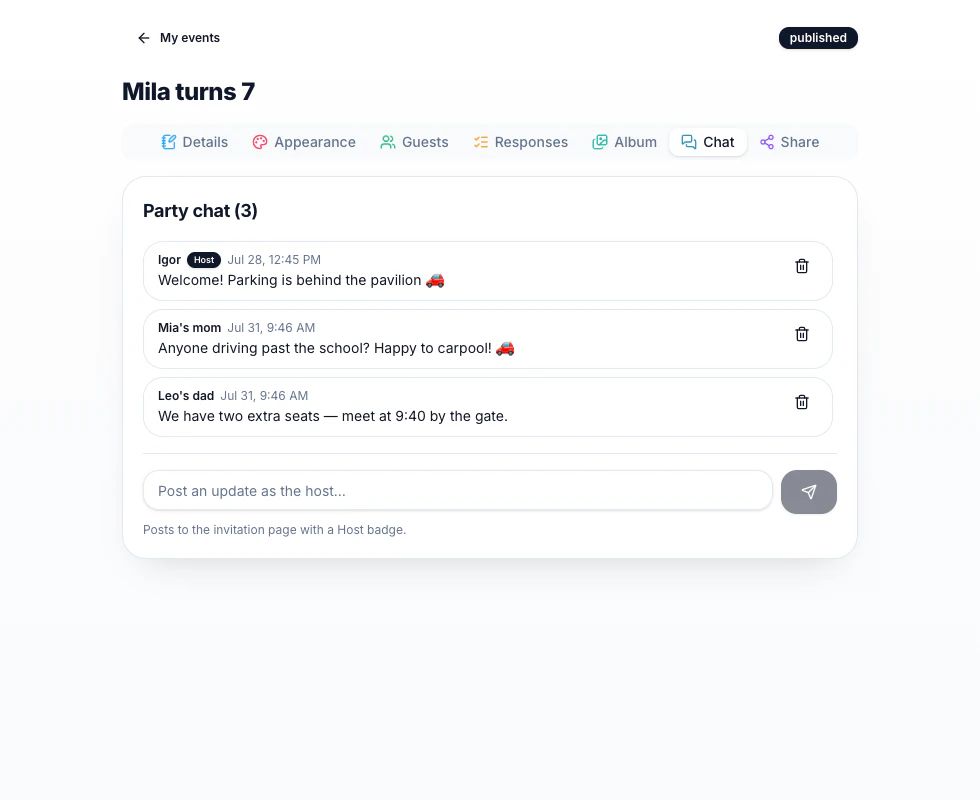
Carpools, 'what should we bring?', 'we're 10 minutes out' — it all happens on the invitation page, so nobody trades phone numbers with thirty strangers.
100% free · no app for guests
On the invitation itself
No app to join, no group to be added to — anyone with the party link can read and post. One tap and they're in the conversation.
You wear the Host badge
Your messages carry an unmistakable Host badge, so announcements stand out from the carpool chatter.
Moderation built in
Remove any message as host. The chat is yours — friendly, on-topic and yours to keep tidy.
Optional, always
Chat is off by default and one toggle away. Turn it on for the class party, leave it off for grandma's brunch.
Good questions
How do guests identify themselves?
Guests pick a display name the first time they post — usually 'Emma's mom' — and it sticks on their device.
Does the chat notify people?
The activity badge shows hosts what's new; guests see new messages when they open the invitation. It's deliberately calm — no push spam.
Can I delete the whole conversation?
Turning chat off hides it instantly for everyone, and you can remove individual messages any time.
Make a party invitation in a few clicks
Guests reply in seconds — no accounts, no apps. Free, forever.