Reminders
The reminders send themselves, and never twice
A nudge to whoever hasn't replied, a see-you-soon to the guests who said yes, an optional thank-you the morning after — and a briefing that comes to you, not to your guest list. Each one reaches a guest once and then never again.
100% free · no app for guests
The nudge, 1–3 days out
It leaves on its own 1–3 days before your RSVP deadline — or before the party, if you left the deadline empty — and only to guests who still haven't answered. By email to anyone who left an address and stayed subscribed; by text to anyone who ticked the SMS box when they replied, or whose 10-digit US or Canadian mobile you typed on the guest list yourself. It starts on, and you pick its channels: email, text or both.
See you soon, at a time you choose
Everyone marked going — same reach rule, an address left and still subscribed — gets the details, the calendar links, your waiver link if you added one, and their line from the what-to-bring list: “You're bringing: Side dish — potato salad.”, or “Still needed…” where the list has gaps. It defaults to 24 hours before the start, and any other moment you pick sends within the hour you picked. On from the start.
The thank-you is opt-in
This one is off until you switch it on — the only automatic send that starts off. Turned on, it reaches going guests 12 to 36 hours after your end time: an AI-written note with the album link, and the photo count if pictures are already up. The Share tab shows a green line once it's out, and the manual button there unlocks when the party is over.
The briefing is yours alone
Two emails to your own inbox, never to the guest list, for every party you host. One when the deadline is two to four days away, naming exactly who hasn't replied — skipped entirely when nobody is left to chase. One in the last 48 hours: final headcount, the allergy notes, anything still unclaimed on the bring list. Turn them off in Account settings.
Good questions
Will my guests get spammed?
No, and there's real machinery behind that rather than good intentions. Every automatic send claims a one-per-party ticket for that recipient before a single message leaves, and a claimed ticket can never be claimed again — so the job can sweep the same window three days running and still send once. Count the most a guest can receive without you touching anything: a confirmation when they reply, one nudge if they hadn't, one see-you-soon if they said yes, one thank-you if you switched it on. Four, for a whole party. Two kids sharing a parent's email get one message between them, not one each, and every one carries an unsubscribe that stops the emails and the texts together.
How do I remind the no-replies right now?
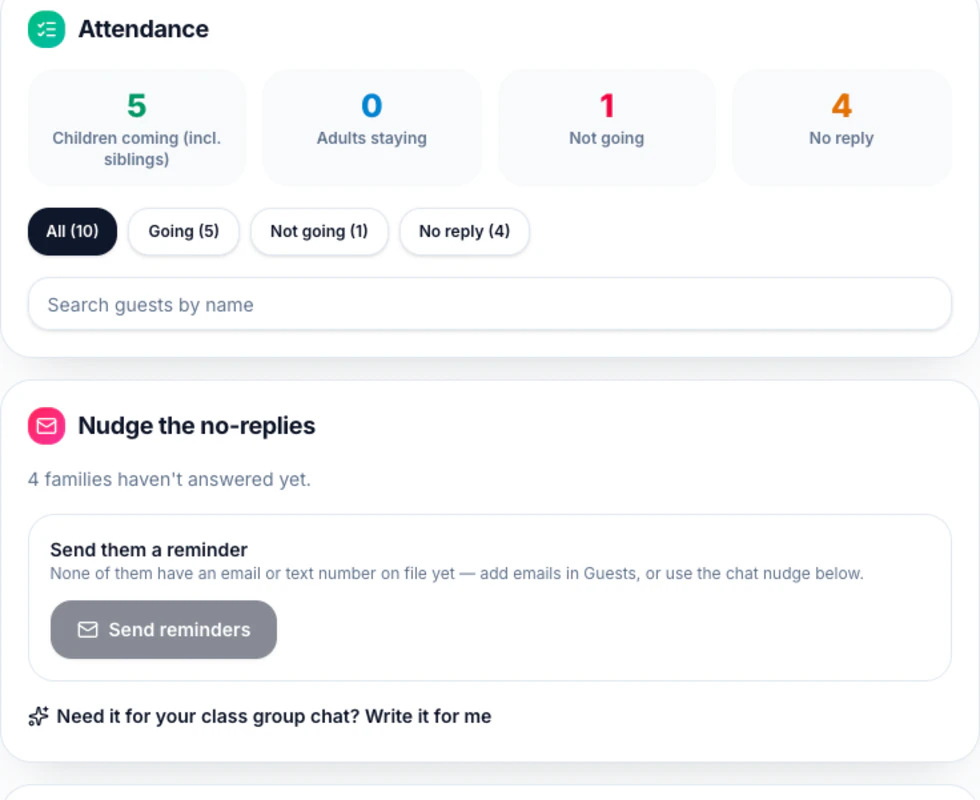
Open Responses and you'll find a “Nudge the no-replies” card counting who's reachable by email and by text. “Send reminders” goes to all of them at once, on both channels, whatever the automatic toggles say — pressing it is you asking. Each guest row has its own “Send reminder” too, and the two share one key per family per day: press twice and the second press tells you they were already reminded today. If you'd rather not email at all, “Write it for me” drafts a nudge naming who hasn't answered, to copy into the class group chat.
Why didn't one of my guests get it?
There are only a few reasons, and each is visible in Responses. They already replied — the nudge only chases no-replies. There's no email on their row. They unsubscribed. They typed a mobile but skipped the SMS box, which starts unchecked, so no text can go. Or the number isn't a 10-digit US or Canadian one; email has no such limit, so a family abroad still gets everything except the SMS. Failing all that, it's the timing: the nudge fires 1–3 days before the deadline, and once the deadline is behind you it stops.
Do I need an RSVP deadline for reminders to work?
No. Leave it empty and the nudge counts back from the party start instead — 1–3 days before the doorbell rings. Setting a deadline just moves that window earlier, which is rather the point of setting one: the headcount arrives while there's still time to order the cake.
Make a party invitation in a few clicks
Guests reply in seconds — no accounts, no apps. Free, forever.